 Tellstack
 Every project, one stack
The inbox shows everything by default — every project, every source, in order. A project is a filter, not a separate area. Running five products still means opening one view.
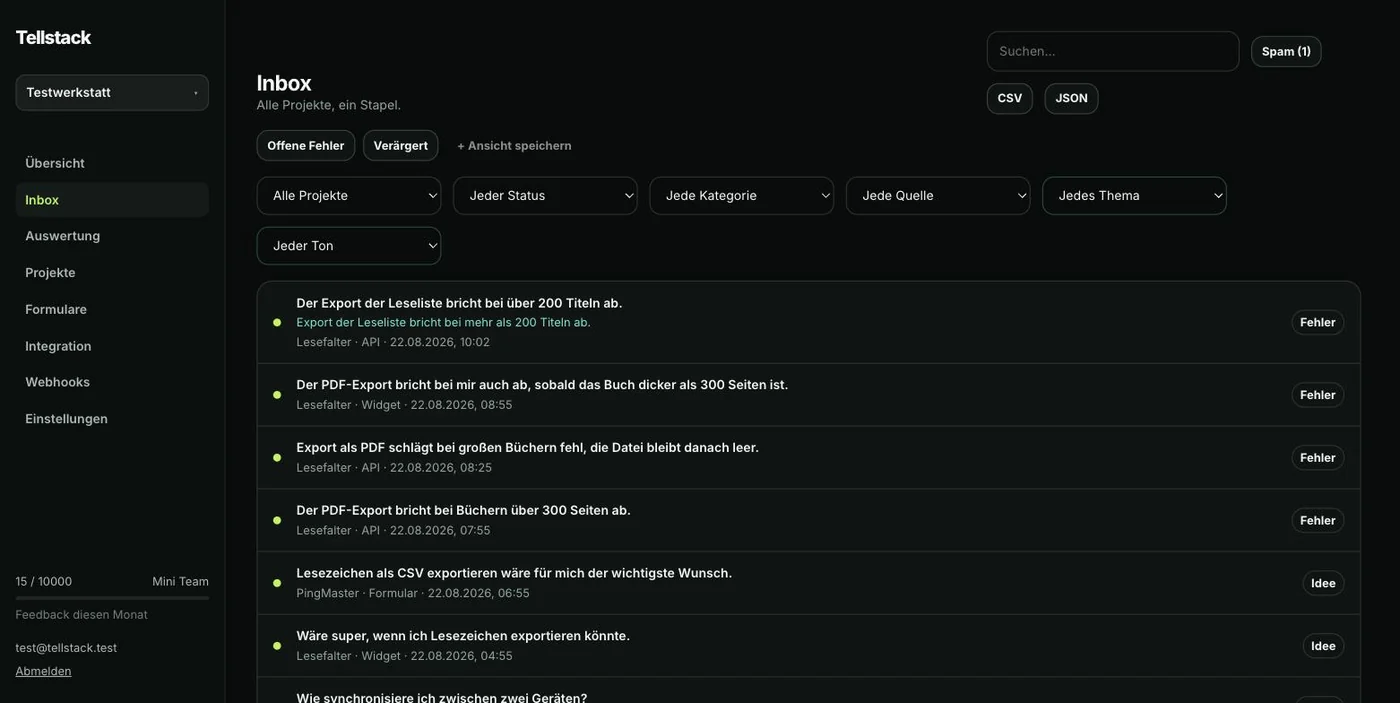
Filters and search
- Project
- Which product. The default is: all of them.
- Status
- new, seen, done.
- Category
- Bug, idea, question, other.
- Source
- Form, widget, API, iOS.
- Search
- Full text across the message, matches partial words too.
Filters live in the page address. A view like "open bugs in app X" can be kept as a bookmark.
What you can do with a piece of feedback
- Reply
- The reply is kept in the thread and, if an address was given, delivered by email.
- Seen
- Automatic on opening — nothing stays "new" by accident.
- Done
- One click, with a timestamp.
- Export
- The current selection as CSV or JSON, from the Indie plan.
- Spam
- Disappears from the view without being deleted.
- Delete
- Removes the feedback and its thread for good.
What the detail view shows
Next to the unchanged message: project, source, category, contact address, page URL, app version and time received — as far as they were supplied. Plus the complete thread of message and replies.
The raw message is never overwritten. Everything derived — AI category, summary, topics — is stored separately.
Goes well with
Brandable forms as the way in, the AI layer to tidy up, and the documentation for the setup.